Ders Notu
Seçmek
const title = document.querySelector("h1");
const cards = document.querySelectorAll(".card");
querySelector ilk eşleşmeyi veya null; querySelectorAll bir NodeList döndürür.
Hedef görünüm
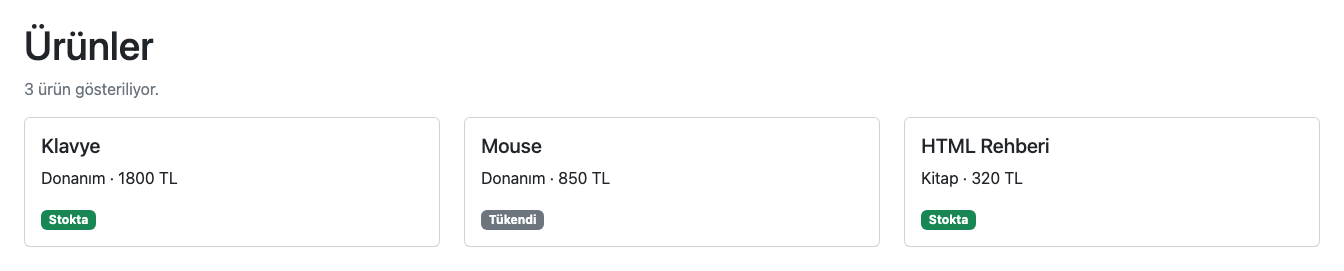
Gerçek tarayıcı çıktısı: JavaScript array verisinden DOM üzerinde oluşturulan kartlar.
Değiştirmek
title.textContent = "Ürünler";
title.classList.add("text-primary");

const image = document.querySelector("img");
image.setAttribute("alt", "Mekanik klavye");
Metin için textContent tercih et. innerHTML HTML parse eder; güvenilmeyen kullanıcı verisiyle kullanma.
Element Üretmek
function createProductCard(product) {
  const article = document.createElement("article");
  article.classList.add("card", "h-100");

  const title = document.createElement("h2");
  title.textContent = product.name;

  article.append(title);
  return article;
}
Render
function renderProducts(products) {
  const list = document.querySelector("#product-list");
  list.textContent = "";

  products.forEach((product) => {
    list.append(createProductCard(product));
  });
}
Silmek
const message = document.querySelector(".temporary-message");
message.remove();
Debug
- Selector sonucunu logla.
- Elements'ta id/class'ı doğrula.
- Container
nullise devam etme. - Render fonksiyonu çağrılmış mı bak.
- Breakpoint ile loop içindeki
productı incele.
Console'daki veri, DOM ile kullanıcı arayüzüne dönüşür.